SelfShapeAI · iPhone & Android

Your next workout starts here.

Choose your store to download SelfShapeAI.

Download on the App Store for iPhone and iPad

Get it on Google Play for Android

Free download. Subscriptions available in the app.

AI training inside the app

Your AI workout, from the plan to the final set.

SelfShapeAI creates your workout, answers your questions, logs the session and organizes progress in one app. AI does not disappear after generating the plan.

Smart WorkoutFive AI Coach styles5.0 on the App Store and Google Play
AI Coach in action

Guidance connected to your active plan

24h
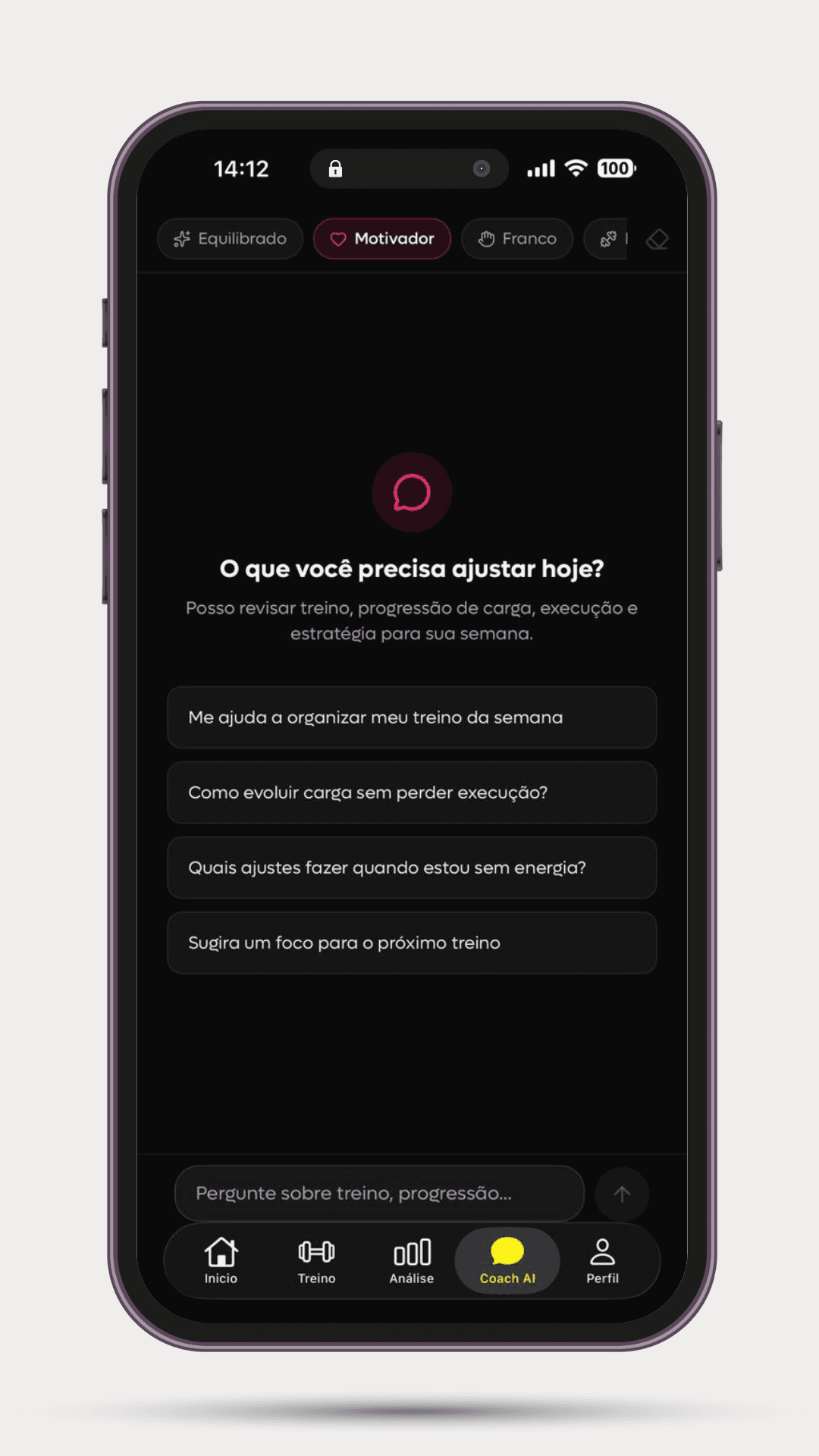
AI Coach screen with five styles and suggestions related to the active workout.
Active plan5 stylesClear adjustments
Where AI helps

It creates, guides and helps you review

Each use of AI supports a real training task. You see the plan, log what you did and continue with your history available.

Smart Workout

A workout built around your reality

Your goal, experience, frequency, equipment and routine come before exercise selection. The result arrives organized by days, sets, repetitions and rest periods.
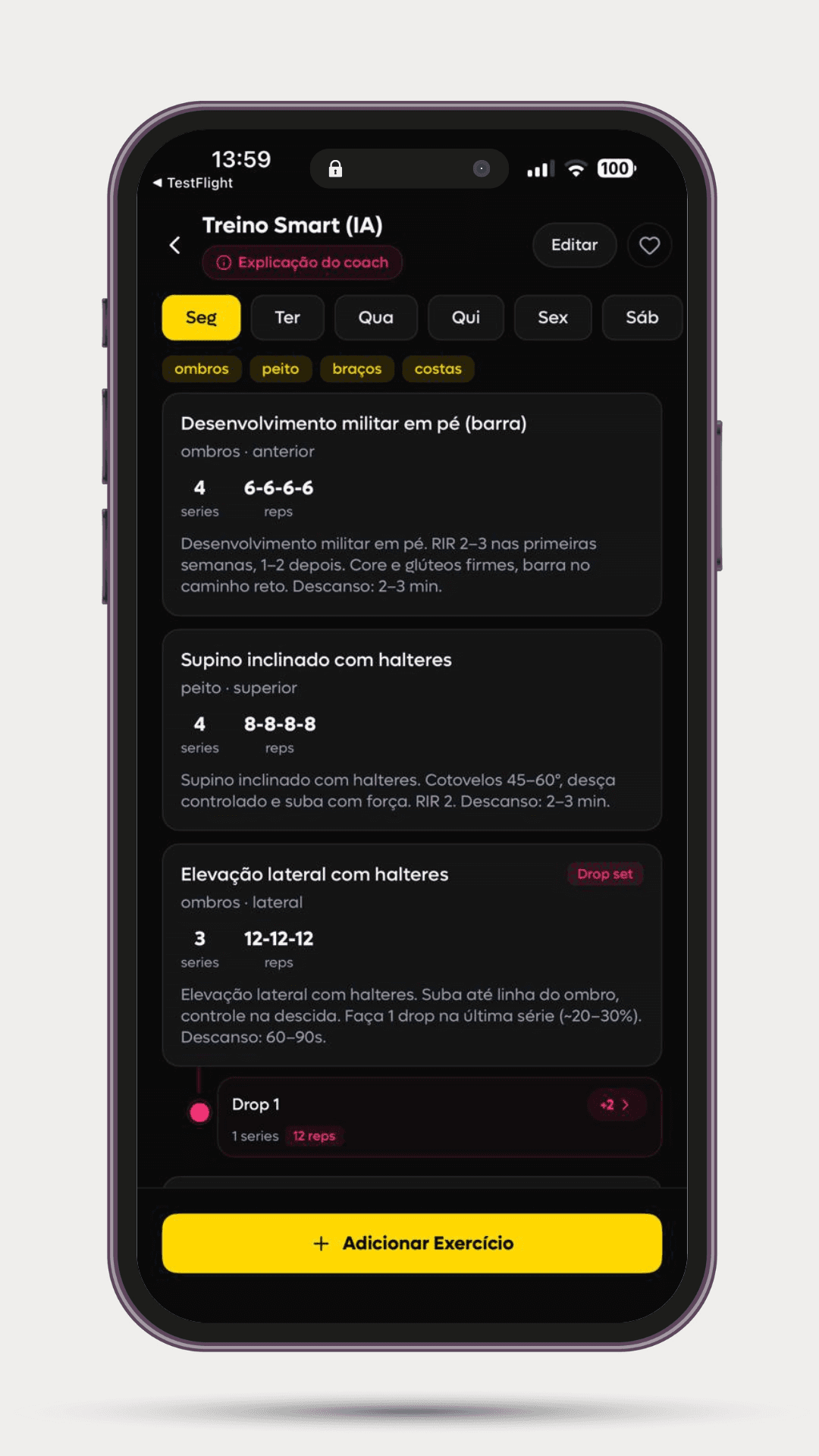
SelfShapeAI Smart Workout with days, exercises, sets, repetitions and the coach's explanation.
  • Split and focus for each day
  • Editable exercises
  • Guidance within the plan
AI Coach

Answers that already know the plan you have open

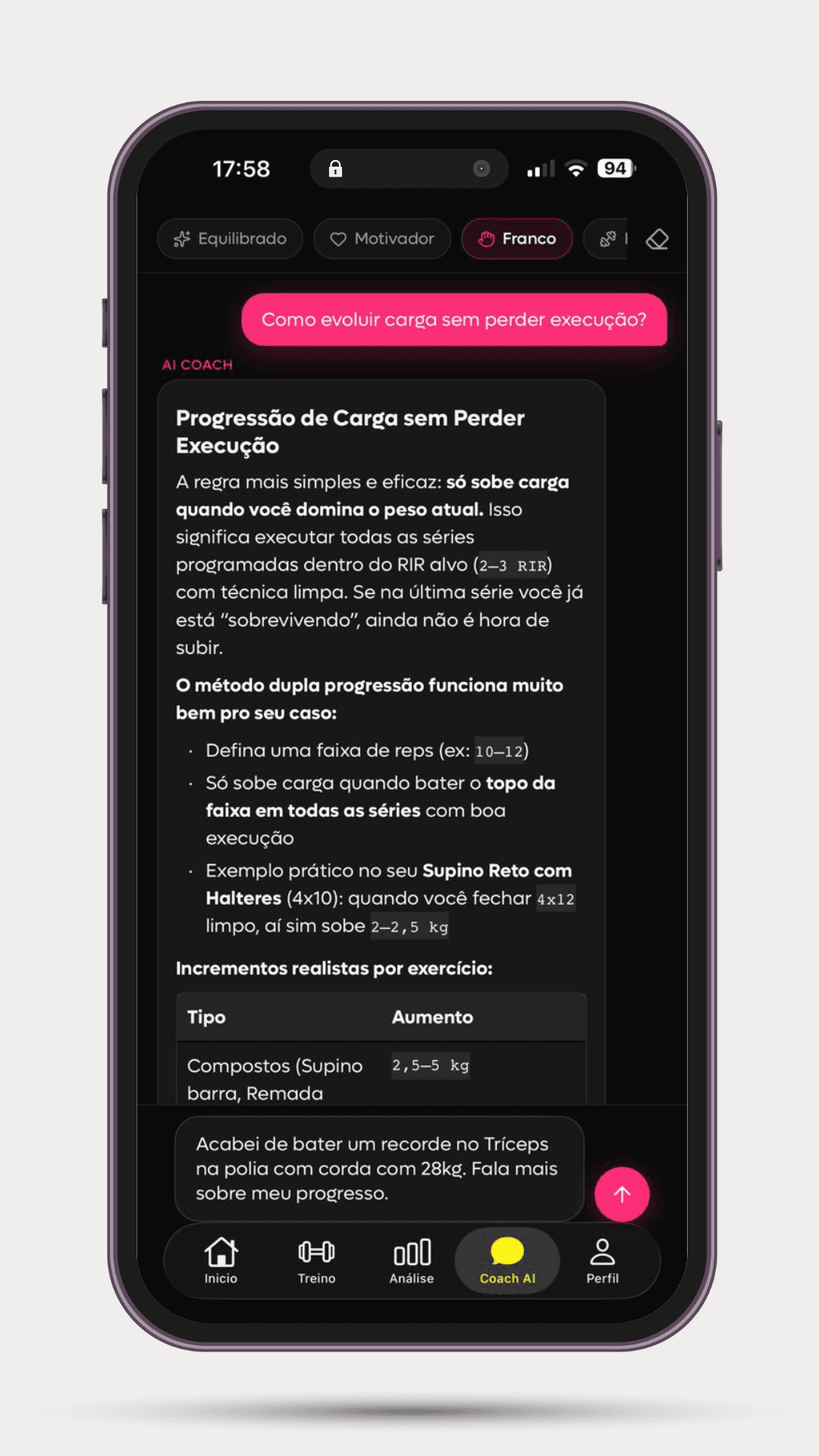
Ask about progression, technique, exercise substitutions or organizing your week. AI Coach uses your active plan as context and can respond in five styles.

SelfShapeAI AI Coach answering about load progression in the context of the workout.
  • Five coach styles
  • Active plan context
  • Guidance available 24/7
Logging and analysis

Your completed workout becomes more than a memory

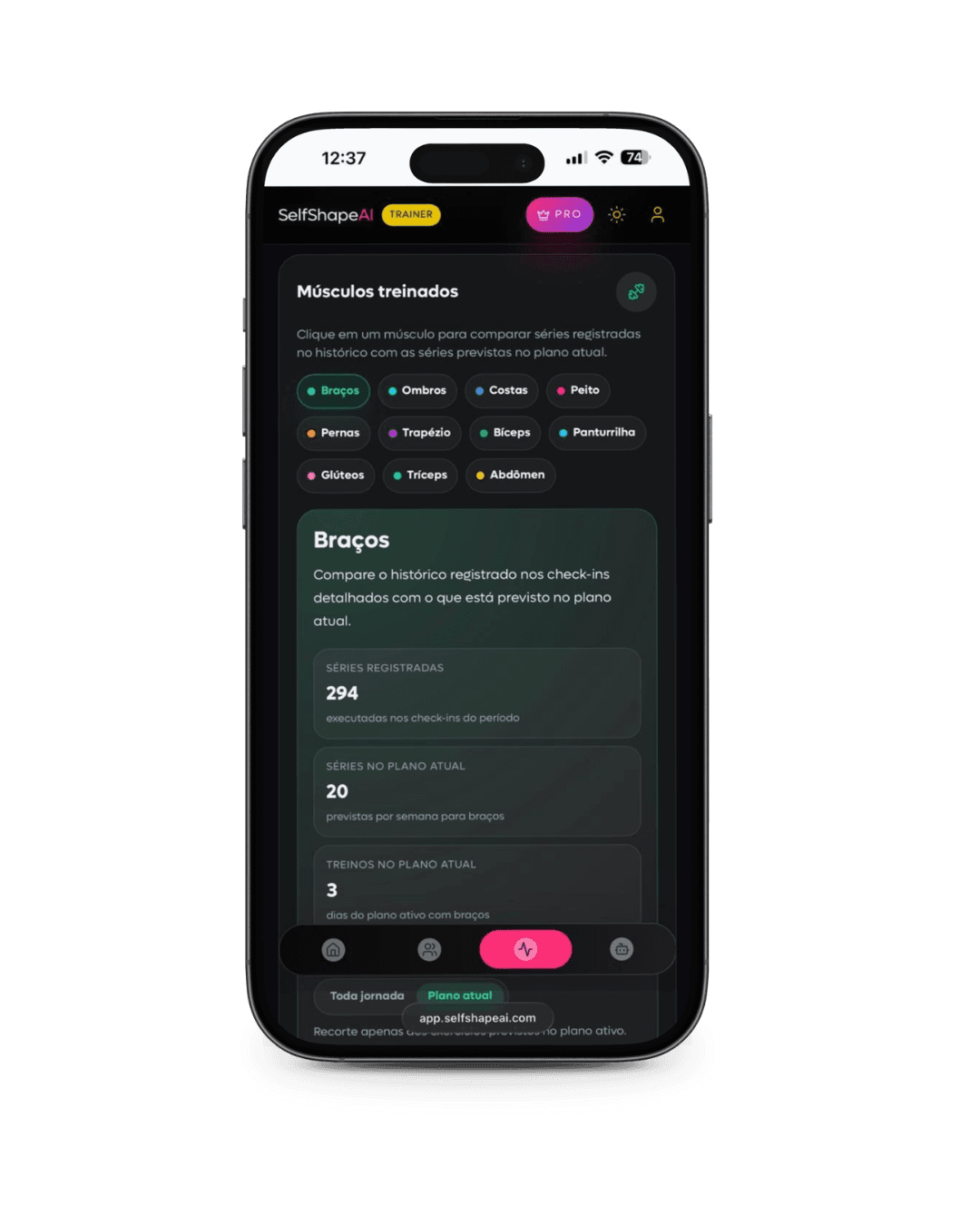
Load, repetitions, RIR/RPE and notes stay linked to the session. The app then organizes volume, muscle groups, records and load per exercise.

SelfShapeAI technical analysis comparing logged sets with the current plan.
  • Session check-in
  • Volume and PRs
  • Comparison with the current plan
Available context

You do not need to explain your workout with every question

The difference is not a longer answer. It is guidance informed by information already organized in the app.

Goal, level and frequency
Your equipment and routine
Active plan and today's exercises
Loads, repetitions, RIR/RPE and notes
Session history and records
Logged body weight

Measurements, photos, sleep and mood are available for your own review in body progress. Today, only body weight from these records enters the AI context.

Session complete

Your workout comes back to you as information

Live
CargaVolumeRecordes
From first use to your history

The app reduces the work between planning and tracking

01

Describe how you train

The assessment gathers the information needed to avoid a generic workout from the start.

02

Open your plan and train

The app shows exercises, sets, videos and rest; on iPhone, Live Activity keeps the session accessible on the lock screen.

03

Log what happened

Check-in preserves loads, repetitions, perceived effort and notes for you to review and compare later.

Compare capabilities, not labels

Generating a list is a start. Supporting a session is a different experience.

See how a workout sheet, a prompt generator and SelfShapeAI handle context, active plans, logging, editing and continuity.

Open the full comparison
Try it in your training

Download for free

Create a plan, complete a session, talk to AI Coach and open your analyses before choosing a subscription.

Your training starts now

Get your training moving

Start with your routine, get a plan that makes sense and turn your first session into history. You are starting a process, beyond choosing a feature list.

Smart assessment
Smart Workout or built from scratch
AI Coach with five personas
Load, reps and perceived effort logging
Workout visible on the iPhone lock screen
Analyses, PRs and muscle map
Body progress and photo history
Stories with real workout data
Plans by phase, Aura, XP, Levels and Ranks
You have already taken the first step

Unlock access and continue

SelfShapeAI starts by asking how you train. In a few steps, your routine becomes a plan you can actually follow.

  1. 01

    Describe how your week works

    Your goal, experience, available days and equipment provide the starting point.

  2. 02

    Get a clear direction

    Your workout arrives organized so you know what to do and why to start there.

  3. 03

    Turn sessions into progress

    Every log builds a history to help you see progress and decide the next step.

Your next step is ready.

Tap the button, open your phone's store and start with your context. Subscription terms appear in the app before confirmation.

Download for free
After putting it into practice

Choose how to keep going

Annual and monthly plans offer the same complete experience. The annual plan combines payment and lowers the equivalent monthly price; the monthly plan gives you the flexibility to renew each month.

Annual

Better value for year-round use

Best value with annual

Monthly equivalent on the annual plan

about R$ 25/month

Keeps your plan, history, AI Coach and progress insights connected across your training phases.

Annual billing: R$ 299,90/year, under the terms shown in the app.

Monthly

Month-to-month flexibility

Same access

Monthly billing

R$ 39,90/month

The complete experience remains available if you prefer to decide each month, with no reduced version of the product.

Monthly billing of R$ 39,90/month, under the terms shown in the app.

Before trying AI training

Is SelfShapeAI just a workout generator?

No. Smart Workout creates the plan, but the app also guides the session, logs loads and repetitions, organizes analyses and keeps AI Coach connected to your active plan.

How does AI build my workout?

The assessment considers your goal, level, frequency, equipment and routine. The app then creates a split with exercises, sets, repetitions, rest periods and guidance that you can review and edit.

Does AI change my workout on its own?

No. You stay in control of your plan. AI Coach can explain choices and suggest adjustments, while changes to days, exercises and focus remain visible and under your control.

What information does AI Coach use?

It uses your profile, assessment, active plan and available training records. Of the body progress records, only body weight currently enters the AI context; measurements, photos, sleep and mood stay organized for your own review.

Do I need an iPhone?

No. SelfShapeAI is available for iPhone on the App Store and for Android on Google Play.

Recommended

You may also enjoy these articles